Aera

Sleep and running tracker for iPhone and Apple Watch

Turn last night into today’s run.

Aera reads your night against your own usual and tells you how hard to go today. Every number shows how it was worked out.

  • Free to download
  • No account
  • Health numbers stay on your iPhone

5.0 from 7 ratings on the Hungarian App Store

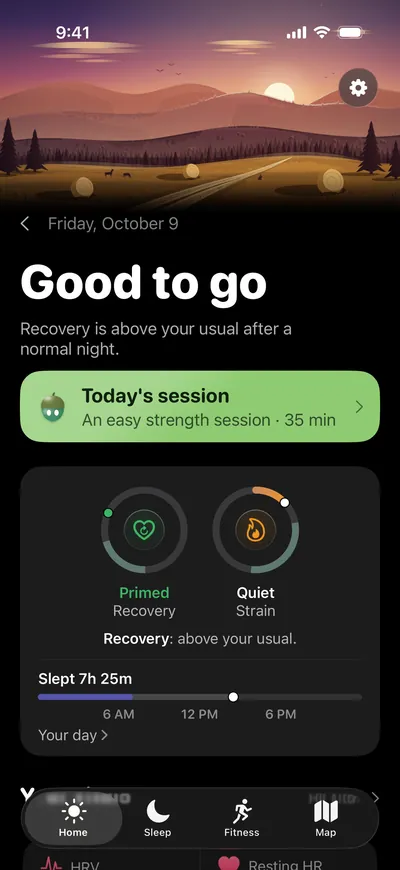
Aera's Home screen: Good to go, recovery above your usual after a normal night, and today's session

A morning with Aera

From last night to out the door.

Every morning starts from the night you actually had. Here is what Aera reads, and what it does with it.

01 Last night

The night as it happened

Hours asleep, the stages, how unbroken it was and your sleeping heart rate, measured against the sleep need Aera learned from your own nights. Watch sleep stages are an estimate, so they count for less, and Aera says so.

The Sleep screen: Excellent, right on your need, 7 hours 25 minutes asleep

02 Overnight

What your heart did while you slept

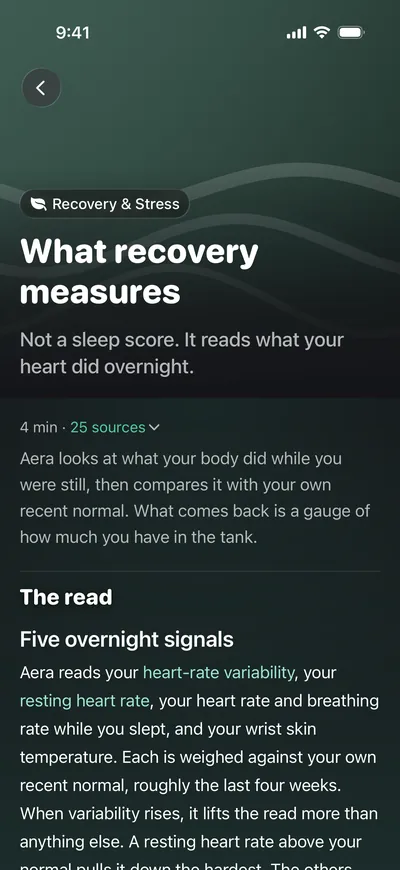
Heart rate variability, resting heart rate, breathing and wrist temperature, each against your own last four weeks. Sleep is not an input, so recovery never turns into a second sleep score.

The Recovery screen: Ready, recovery is in your usual range

03 This morning

One plain word for the day

Your recovery, sleep, stress and recent training decide the call, with the reasons beside it. Free every morning, once Aera has a few weeks of your nights and workouts. Until then it says it is still learning.

  • Rest day
  • Go easy
  • Good to go
  • Go for it
The Home screen: Good to go

04 Today's run

How long, and how hardPremium

Aera writes today's session from the week you actually had: an easy 35 minutes, say, and nothing at all on a rest day.

Today's session: good to go, freshness is the one holding back

05 Out the door

Draw the route from your door

Tap the map and the line keeps to real paths, with the distance counting as you draw. Follow it turn by turn on your iPhone or Apple Watch, spoken if you want it, even with no signal.

The route planner over a satellite map

How the call is made

Three signals in. One plain word out.

Aera's Today screen: Good to go. Recovery is above your usual after a normal night. Today's session: an easy strength session, 35 minutes.
  1. Last night, as it happened Your sleep, your heart overnight and the strain of your week, read from Apple Health on your iPhone.
  2. Against your own usual Each one lands on the range learned from your own weeks, not on an average of strangers.
  3. One word for the day Rest day, go easy, good to go or go for it, with the reasons right beside it.

Illustration. In the app every number opens an article that shows how it was worked out.

From early users

Mornings that feel right.

Matches how I feel

The numbers line up with how my body actually feels in the morning, sleep most of all. Closer than the sleep scores I was used to.

Founding tester

Clear at a glance

A design people like, with the data laid out clearly. A good mix of wellness and training.

App Store review

Fast and simple

Quick, straightforward and easy to find your way around, with a lot inside.

App Store review

What testers and App Store reviewers tell us, in our words.

The Field Guide

Every number shows its work.

Tap a number and it opens a short article: how it was worked out, the research behind it with sources you can open, and where it stops being reliable.

“Apple Watch sleep stages are an estimate. Aera gives them less weight, and tells you so.”

From the article on your sleep score
Read the notes on this site →
The Field Guide article on your sleep score
The Field Guide article on what recovery measures

After the run

Fly back over the run you just did.

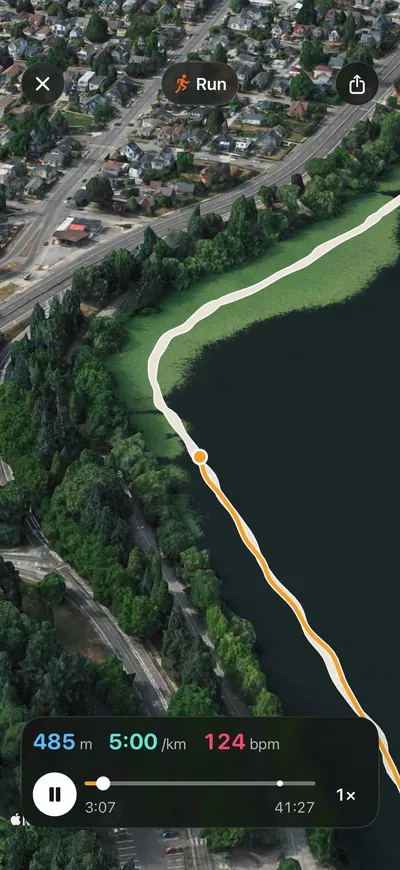
Flyover turns your run into a short film, flying your route in 3D over the real ground. It pauses at your fastest split and the top of the climb, with pace, heart rate and elevation along the way.

Free for runs from the last seven days.

Aera's Flyover replaying a run in 3D over the real ground, with elevation, pace and heart rate

Your map

Draw your route. Then just run.

Tap the map and the line keeps to real streets and trails, with the distance counting up as you draw. Already have a route? Open the GPX file.

Along the way, Aera lists what you will meet from OpenStreetMap: springs, viewpoints, summits and more.

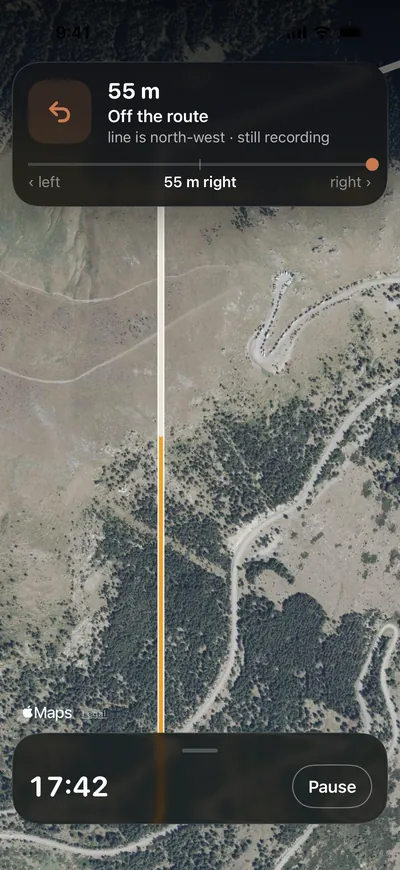
Turn by turn on your wrist, even with no signal. Spoken aloud if you like. Drift off the line and it tells you, then again when you are back on it.

Distance6.4km

The planner and turn by turn are free.

From OpenStreetMap
Spring
Viewpoint
Summit 412 m
Aera on iPhone following a route turn by turn, with a note that you are off the route.

On your Home Screen

Your morning, before you open anything.

Widgets for the Home Screen and the Lock Screen: today's session, last night against your need, this morning's vitals against your usual, your week and your last run on a map. They show what the app shows. Not one of them prints a score.

  1. Home Screen
  2. Lock Screen
  3. Apple Watch

On Apple Watch, today's read is on your wrist, and it records your walks, runs and rides.

Also in the app

Small things, done properly.

Apple Watch

Record a run on your watch alone, with auto-pause, and feel each turn of a route.

Widgets

In every size, on the Home Screen and the Lock Screen.

Recap films

Your week, month and year as short films, free.

Share cards

Satellite, terrain and splits looks. Rewrite any word, pick any colour.

Your data, out

Raw data as JSON or GPX, free. Reports and every other format with Premium.

Your language

English, Magyar, Deutsch, Español, Français and more.

Health numbers stay on your iPhone.

Aera reads Apple Health on the phone and works out every score there. No account, no sign in, and no language model anywhere in the app. Product analytics stay off until you turn them on and never include health values. Crash reports help fix bugs.

Read the privacy policy →

Free to use. Premium when you want more.

Free

Every day, for everyone.

  • Recovery, stress, strain and your sleep score
  • Hard, easy or rest, every morning
  • The route planner and turn by turn
  • Every workout read, every personal best
  • Flyover for the last seven days
  • Twelve months of history, raw data as JSON or GPX

Premium

Monthly, yearly, or once and yours for good. Yearly starts with a 7-day free trial.

  • Today's session: how long and how hard
  • Your sleep reserve
  • Your places
  • Flyover for older runs
  • Every route you draw, kept (the first is free)
  • History past twelve months
  • Reports and every export format

Questions

What people ask before they download.

What does Aera do?

Aera is an iPhone and Apple Watch app that reads Apple Health and tells you each morning how hard to go: rest day, go easy, good to go or go for it. It reads your sleep, recovery, stress and strain against your own usual, plans routes on a map with turn-by-turn directions, and explains every number in a short article.

Is Aera free?

Yes. Recovery, stress, strain and your sleep score, the call for the day, the route planner, turn by turn, every workout read, every personal best and Flyover for the last seven days are free. Premium adds today's session, your sleep reserve, your places, older Flyovers, history past twelve months, reports and every export format.

Do I need an account, and where does my data go?

There is no account. Aera reads Apple Health on your iPhone and works out every score there, so health numbers stay on your iPhone. There is no language model in the app. Product analytics stay off until you turn them on and never include health values.

Do I need an Apple Watch?

An Apple Watch gives Aera the overnight heart and sleep signals most reads are built on. Without one, Aera works from what your iPhone records, like steps and workouts, and the reads that need a watch wait until there is data.

How does Aera know what is normal for me?

It learns your usual range from your own nights and sessions over several weeks, then compares each new day with it. While your history is thin, it says it is still learning instead of guessing.

Is Aera a medical device?

No. Aera is for everyday wellbeing and training. Watch measurements such as sleep stages are estimates, and every article says where its number stops being reliable.

Which languages does Aera speak?

English, Hungarian, German, Spanish and French in full, and Italian, Japanese, Portuguese and Traditional Chinese in part.
Who makes it

Made by one person.

Aera is built by Gergő Varga, on his own, with no company behind it. The app says so in its settings. A message from the app or from this site reaches him directly.

Write to him →

Tomorrow morning, see what last night says.